Medication Tracker & Reminder
Publisher Description

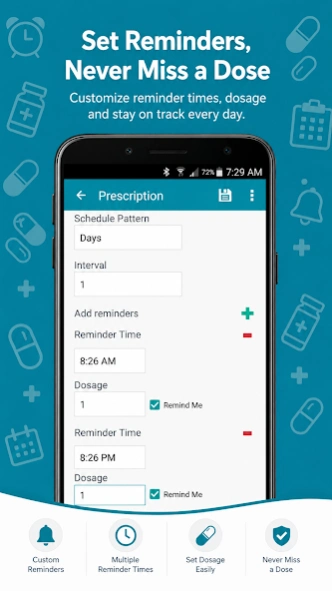


Never miss a pill! Smart medication tracker, pill reminder & prescription alarm.
Never miss a dose again! Stay on top of your health with Medicine Tracker – Pill Reminder & Medication Manager. Managing multiple prescriptions, vitamins, and supplements can be overwhelming. Whether you are a caregiver looking after family members, a senior staying independent, or managing a chronic condition, Medicine Tracker simplifies your healthcare routine.
This all-in-one medication tracker combines a reliable pill alarm, prescription manager, health vitals log, and doctor appointment organizer into one secure, easy-to-use app.
Take control of your health today and gain peace of mind.
💊 Smart Pill Reminder & Medicine Alarm
* Reliable Pill Alarms: Get timely notifications to take your medicines, tablets, and vitamins exactly on schedule.
* Flexible Scheduling: Create daily, weekly, monthly, or custom recurring intervals tailored to your prescription.
* Custom Alert Profiles: Choose from Silent, Vibrate, Sound, or Sound + Vibrate modes so you never miss an alert.
* At-a-Glance Dashboard: View all upcoming doses and medicine schedules right from your home screen.
👨👩👧 Multi-Profile Family Health Organizer
* Manage Multiple Patients: Keep track of prescription schedules for your children, parents, or pets in a single app.
* Separate Profiles: Create independent medicine logs and custom reminders for every family member.
📋 Prescription Tracker & Medication Log
* Dose History: Monitor your progress by tracking completed, missed, or upcoming doses.
* Calendar & List Views: Visualize your medicine intake history dynamically to ensure complete compliance.
❤️ Health Vitals & Medical Journal
* Vitals Log: Record daily health metrics, symptoms, and condition updates.
* Side-Effect Diary: Add notes about recovery, pain levels, or medication side effects to share with your doctor.
🩺 Doctor Appointments & Medical Contacts
* Appointment Organizer: Schedule doctor visits and set helpful reminders so you are always prepared.
* Contact Directory: Save quick-access information for your primary care physicians, local pharmacies, and specialists.
📊 Exportable Health Reports
* Share with Ease: Export your complete medicine log and health history into clean HTML or CSV formats.
* Caregiver Ready: Email structured reports directly to your doctor, nurse, or family members.
📱 Convenient Home Screen Widgets
* Instant Insights: Check your next pill reminder, today’s remaining medicine count, and upcoming doctor appointments without opening the app.
🔒 Secure Backup & Privacy
* Privacy Lock: Protect sensitive health data with secure password protection.
* Cloud & Local Sync: Seamlessly back up and restore your settings via Google Drive or local storage.
⚠️ Important Notes & Android Optimization
* Storage Warning: To ensure background pill reminders and widgets function perfectly, please install this app directly onto your device’s internal storage (moving to an SD card may disable Android OS alarms).
🔒 Required Permissions & Transparency
* Google Account Access: For secure Google Drive cloud backup and sync.
* Internet Access: To facilitate seamless cloud data recovery.
* Storage / SD Card Access: Required only to export health reports and create local backups.
Why choose Medicine Tracker?
It is more than just a tablet reminder—it is your digital healthcare assistant. By combining a daily medicine tracker with an intuitive medical journal, we help you stay organized, compliant, and healthy.
Download Medicine Tracker today and make healthcare management completely stress-free!
About Medication Tracker & Reminder
The company that develops Medication Tracker & Reminder is NSquareMobileApps. The latest version released by its developer is 1.0 .
To install Medication Tracker & Reminder on your Android device, just click the green Continue To App button above to start the installation process. The app is listed on our website since 2026-08-03 and was downloaded 5 times. We have already checked if the download link is safe, however for your own protection we recommend that you scan the downloaded app with your antivirus. Your antivirus may detect the Medication Tracker & Reminder as malware as malware if the download link to com.nsquare.android.medhelper.pro is broken.
How to install Medication Tracker & Reminder on your Android device:
- Click on the Continue To App button on our website. This will redirect you to Google Play.
- Once the Medication Tracker & Reminder is shown in the Google Play listing of your Android device, you can start its download and installation. Tap on the Install button located below the search bar and to the right of the app icon.
- A pop-up window with the permissions required by Medication Tracker & Reminder will be shown. Click on Accept to continue the process.
- Medication Tracker & Reminder will be downloaded onto your device, displaying a progress. Once the download completes, the installation will start and you'll get a notification after the installation is finished.
Program Details
System requirements
Download information
Pricing
Version History
version
posted on 2026-08-03
- Backup without storage permission
- Google Backup/Restore Fix
- Fixed Alarm
version
posted on 2026-01-19
- Backup without storage permission
- Google Backup/Restore Fix
version 1.8
posted on 2021-07-10
- Google Backup/Restore Fix
version 1.8
posted on 2021-04-01
- Shortcuts
- Minor Fixes
